<?xml version="1.0" encoding="utf-8"?><feed xmlns="http://www.w3.org/2005/Atom" ><generator uri="https://jekyllrb.com/" version="3.10.0">Jekyll</generator><link href="/feed.xml" rel="self" type="application/atom+xml" /><link href="/" rel="alternate" type="text/html" /><updated>2025-01-11T15:46:55+00:00</updated><id>/feed.xml</id><title type="html">Changning Niu</title><subtitle>A personal website of Changning Niu.
</subtitle><entry><title type="html">How to use SQS for disordered materials</title><link href="/2017/08/05/SQS.html" rel="alternate" type="text/html" title="How to use SQS for disordered materials" /><published>2017-08-05T15:57:25+00:00</published><updated>2017-08-05T15:57:25+00:00</updated><id>/2017/08/05/SQS</id><content type="html" xml:base="/2017/08/05/SQS.html"><![CDATA[<p><em>Table of Contents</em></p>
<ul id="markdown-toc">
  <li><a href="#preface" id="markdown-toc-preface">Preface</a></li>
  <li><a href="#compile-a-mcsqs-that-saves-all-bestsqs" id="markdown-toc-compile-a-mcsqs-that-saves-all-bestsqs">Compile a mcsqs that saves all bestsqs</a></li>
  <li><a href="#generate-sqs" id="markdown-toc-generate-sqs">Generate SQS</a>    <ul>
      <li><a href="#run-corrdump" id="markdown-toc-run-corrdump">Run corrdump</a>        <ul>
          <li><a href="#the-rndstrin-file" id="markdown-toc-the-rndstrin-file">The rndstr.in file</a></li>
          <li><a href="#the--2--3-parameters" id="markdown-toc-the--2--3-parameters">The “-2, -3” parameters</a></li>
        </ul>
      </li>
      <li><a href="#run-mcsqs" id="markdown-toc-run-mcsqs">Run mcsqs</a>        <ul>
          <li><a href="#regular-search" id="markdown-toc-regular-search">Regular search</a></li>
          <li><a href="#search-with-a-fixed-cell-with-sqscellout" id="markdown-toc-search-with-a-fixed-cell-with-sqscellout">Search with a fixed cell with sqscell.out</a></li>
          <li><a href="#search-for-sqs-with-equi-length-vectors" id="markdown-toc-search-for-sqs-with-equi-length-vectors">Search for SQS with equi-length vectors</a></li>
        </ul>
      </li>
      <li><a href="#convert-sqs-to-poscar" id="markdown-toc-convert-sqs-to-poscar">Convert SQS to POSCAR</a></li>
    </ul>
  </li>
  <li><a href="#faqs" id="markdown-toc-faqs">FAQs</a>    <ul>
      <li><a href="#how-to-read-the-output-files" id="markdown-toc-how-to-read-the-output-files">How to read the output files?</a>        <ul>
          <li><a href="#the-bestsqsout-file" id="markdown-toc-the-bestsqsout-file">The bestsqs.out file</a></li>
          <li><a href="#the-bestcorrout-file" id="markdown-toc-the-bestcorrout-file">The bestcorr.out file</a></li>
          <li><a href="#the-mcsqslog-file" id="markdown-toc-the-mcsqslog-file">The mcsqs.log file</a></li>
        </ul>
      </li>
      <li><a href="#how-to-tell-if-a-sqs-is-good" id="markdown-toc-how-to-tell-if-a-sqs-is-good">How to tell if a SQS is good?</a></li>
      <li><a href="#how-to-accelerate-the-generation-of-sqs" id="markdown-toc-how-to-accelerate-the-generation-of-sqs">How to accelerate the generation of SQS?</a></li>
    </ul>
  </li>
</ul>

<blockquote>
  <p>This article assumes the reader already has basic knowledge about Special Quasi-random Structure (SQS).</p>
</blockquote>

<h2 id="preface">Preface</h2>
<p>I am a co-author of <em>Chapter 10: Applications of Special Quasi-random Structures to High-Entropy Alloys</em> (M. C. Gao, <strong>C. Niu</strong>, C. Jiang, D. L. Irving) of the book <em>High-Entropy Alloys</em> (Ed. M. C. Gao, J. W. Yeh, P. K. Liaw, Y. Zhang, Springer, 2016). This chapter of the book focuses on the application of SQS in research with a wide variety of topics. Often, some researchers who begin to use SQS email me, asking about more basic usage of SQS. So I wrote this article, focusing on its basic usage with practical tips.</p>

<p>Note: the best place to seek help on the usage of <code class="language-plaintext highlighter-rouge">mcsqs</code> is the <a href="http://www.brown.edu/Departments/Engineering/Labs/avdw/forum/" target="_blank">official ATAT forum</a>. Dr. Axel van de Walle gave many excellent answers here.</p>

<p><a rel="license" href="http://creativecommons.org/licenses/by-nc/4.0/"><img alt="Creative Commons License" style="border-width:0" src="https://i.creativecommons.org/l/by-nc/4.0/80x15.png" /></a><br />This work is licensed under a <a rel="license" href="http://creativecommons.org/licenses/by-nc/4.0/">Creative Commons Attribution-NonCommercial 4.0 International License</a>.</p>

<h2 id="compile-a-mcsqs-that-saves-all-bestsqs">Compile a mcsqs that saves all bestsqs</h2>
<p>There is no need for me to introduce how to compile ATAT here; the manual has clear instructions. However, I have a minor complaint about how the <code class="language-plaintext highlighter-rouge">mcsqs</code> code handles intermediate SQS – it only saves the last one it finds as <code class="language-plaintext highlighter-rouge">bestsqs.out</code>. Even though this makes sense in that the last one always has the best matched correlation functions, there are other factors one needs to consider when selecting a SQS, e.g., the shape of the cell. It is better if all SQS (whether perfect or imperfect) are stored with their correlation functions. This also helps if the user uses a bestsqs for further calculations before the <code class="language-plaintext highlighter-rouge">mcsqs</code> finishes searching, and now there is no risk that this bestsqs gets overwritten.</p>

<p>To have this modified version, find the following lines in <code class="language-plaintext highlighter-rouge">atat/src/mcsqs.c++</code> before compilation:</p>
<div class="language-c++ highlighter-rouge"><div class="highlight"><pre class="highlight"><code><span class="c1">// Line 425 of mcsqs.c++</span>
<span class="kt">int</span> <span class="n">tic</span><span class="o">=</span><span class="mi">0</span><span class="p">;</span>
<span class="n">Real</span> <span class="n">obj</span><span class="o">=</span><span class="n">best</span><span class="p">.</span><span class="n">obj</span><span class="p">;</span>
<span class="n">best</span><span class="p">.</span><span class="n">obj</span><span class="o">=</span><span class="n">MAXFLOAT</span><span class="p">;</span>
<span class="k">while</span> <span class="p">(</span><span class="mi">1</span><span class="p">)</span> <span class="p">{</span>
  <span class="k">if</span> <span class="p">(</span><span class="n">obj</span><span class="o">&lt;</span><span class="n">best</span><span class="p">.</span><span class="n">obj</span><span class="p">)</span> <span class="p">{</span>
    <span class="c1">// cerr &lt;&lt; "Best" &lt;&lt; endl;</span>
    <span class="n">best</span><span class="o">=</span><span class="n">mc</span><span class="p">(</span><span class="n">cc</span><span class="p">);</span>
    <span class="n">ofstream</span> <span class="n">strfile</span><span class="p">;</span>
    <span class="n">open_numbered_file</span><span class="p">(</span><span class="n">strfile</span><span class="p">,</span> <span class="s">"bestsqs"</span><span class="p">,</span><span class="n">ip</span><span class="p">,</span><span class="s">".out"</span><span class="p">);</span>
    <span class="n">strfile</span><span class="p">.</span><span class="n">setf</span><span class="p">(</span><span class="n">ios</span><span class="o">::</span><span class="n">fixed</span><span class="p">);</span>
    <span class="n">strfile</span><span class="p">.</span><span class="n">precision</span><span class="p">(</span><span class="n">sigdig</span><span class="p">);</span>
    <span class="n">write_structure</span><span class="p">(</span><span class="n">best</span><span class="p">.</span><span class="n">str</span><span class="p">,</span><span class="n">ulat</span><span class="p">,</span><span class="n">site_type_list</span><span class="p">,</span><span class="n">atom_label</span><span class="p">,</span><span class="n">axes</span><span class="p">,</span><span class="n">strfile</span><span class="p">);</span>
    <span class="n">ofstream</span> <span class="n">corrfile</span><span class="p">;</span>
    <span class="n">open_numbered_file</span><span class="p">(</span><span class="n">corrfile</span><span class="p">,</span> <span class="s">"bestcorr"</span><span class="p">,</span><span class="n">ip</span><span class="p">,</span><span class="s">".out"</span><span class="p">);</span>
    <span class="n">corrfile</span><span class="p">.</span><span class="n">setf</span><span class="p">(</span><span class="n">ios</span><span class="o">::</span><span class="n">fixed</span><span class="p">);</span>
    <span class="n">corrfile</span><span class="p">.</span><span class="n">precision</span><span class="p">(</span><span class="n">sigdig</span><span class="p">);</span>
</code></pre></div></div>
<p>Replace the lines above with the following lines:</p>
<div class="language-c++ highlighter-rouge"><div class="highlight"><pre class="highlight"><code><span class="kt">int</span> <span class="n">tic</span><span class="o">=</span><span class="mi">0</span><span class="p">;</span>
<span class="n">Real</span> <span class="n">obj</span><span class="o">=</span><span class="n">best</span><span class="p">.</span><span class="n">obj</span><span class="p">;</span>
<span class="n">best</span><span class="p">.</span><span class="n">obj</span><span class="o">=</span><span class="n">MAXFLOAT</span><span class="p">;</span>
<span class="kt">int</span> <span class="n">count_cniu</span><span class="o">=</span><span class="mi">1</span><span class="p">;</span>                                       <span class="c1">// added by cniu</span>
<span class="k">while</span> <span class="p">(</span><span class="mi">1</span><span class="p">)</span> <span class="p">{</span>
  <span class="k">if</span> <span class="p">(</span><span class="n">obj</span><span class="o">&lt;</span><span class="n">best</span><span class="p">.</span><span class="n">obj</span><span class="p">)</span> <span class="p">{</span>
    <span class="c1">// cerr &lt;&lt; "Best" &lt;&lt; endl;</span>
    <span class="n">best</span><span class="o">=</span><span class="n">mc</span><span class="p">(</span><span class="n">cc</span><span class="p">);</span>
    <span class="n">ofstream</span> <span class="n">strfile</span><span class="p">;</span>
    <span class="n">stringstream</span> <span class="n">out_cniu</span><span class="p">;</span>                              <span class="c1">// added by cniu</span>
    <span class="n">out_cniu</span> <span class="o">&lt;&lt;</span> <span class="n">count_cniu</span><span class="o">++</span><span class="p">;</span>                           <span class="c1">// added by cniu</span>
    <span class="n">std</span><span class="o">::</span><span class="n">string</span> <span class="n">str1_cniu</span> <span class="o">=</span> <span class="s">"bestsqs-"</span><span class="p">;</span>                 <span class="c1">// added by cniu</span>
    <span class="n">str1_cniu</span> <span class="o">+=</span> <span class="n">out_cniu</span><span class="p">.</span><span class="n">str</span><span class="p">();</span>                        <span class="c1">// added by cniu</span>
    <span class="n">std</span><span class="o">::</span><span class="n">string</span> <span class="n">str2_cniu</span> <span class="o">=</span> <span class="s">"bestcorr-"</span><span class="p">;</span>                <span class="c1">// added by cniu</span>
    <span class="n">str2_cniu</span> <span class="o">+=</span> <span class="n">out_cniu</span><span class="p">.</span><span class="n">str</span><span class="p">();</span>                        <span class="c1">// added by cniu</span>
    <span class="kt">char</span> <span class="o">*</span><span class="n">cstr1_cniu</span> <span class="o">=</span> <span class="k">new</span> <span class="kt">char</span><span class="p">[</span><span class="n">str1_cniu</span><span class="p">.</span><span class="n">length</span><span class="p">()</span><span class="o">+</span><span class="mi">1</span><span class="p">];</span>  <span class="c1">// added by cniu</span>
    <span class="kt">char</span> <span class="o">*</span><span class="n">cstr2_cniu</span> <span class="o">=</span> <span class="k">new</span> <span class="kt">char</span><span class="p">[</span><span class="n">str2_cniu</span><span class="p">.</span><span class="n">length</span><span class="p">()</span><span class="o">+</span><span class="mi">1</span><span class="p">];</span>  <span class="c1">// added by cniu</span>
    <span class="n">strcpy</span><span class="p">(</span><span class="n">cstr1_cniu</span><span class="p">,</span><span class="n">str1_cniu</span><span class="p">.</span><span class="n">c_str</span><span class="p">());</span>               <span class="c1">// added by cniu</span>
    <span class="n">strcpy</span><span class="p">(</span><span class="n">cstr2_cniu</span><span class="p">,</span><span class="n">str2_cniu</span><span class="p">.</span><span class="n">c_str</span><span class="p">());</span>               <span class="c1">// added by cniu</span>
    <span class="n">open_numbered_file</span><span class="p">(</span><span class="n">strfile</span><span class="p">,</span><span class="n">cstr1_cniu</span><span class="p">,</span><span class="n">ip</span><span class="p">,</span><span class="s">".out"</span><span class="p">);</span>   <span class="c1">// changed by cniu</span>
    <span class="k">delete</span> <span class="p">[]</span> <span class="n">cstr1_cniu</span><span class="p">;</span>                               <span class="c1">// added by cniu</span>
    <span class="n">strfile</span><span class="p">.</span><span class="n">setf</span><span class="p">(</span><span class="n">ios</span><span class="o">::</span><span class="n">fixed</span><span class="p">);</span>
    <span class="n">strfile</span><span class="p">.</span><span class="n">precision</span><span class="p">(</span><span class="n">sigdig</span><span class="p">);</span>
    <span class="n">write_structure</span><span class="p">(</span><span class="n">best</span><span class="p">.</span><span class="n">str</span><span class="p">,</span><span class="n">ulat</span><span class="p">,</span><span class="n">site_type_list</span><span class="p">,</span><span class="n">atom_label</span><span class="p">,</span><span class="n">axes</span><span class="p">,</span><span class="n">strfile</span><span class="p">);</span>
    <span class="n">ofstream</span> <span class="n">corrfile</span><span class="p">;</span>
    <span class="n">open_numbered_file</span><span class="p">(</span><span class="n">corrfile</span><span class="p">,</span><span class="n">cstr2_cniu</span><span class="p">,</span><span class="n">ip</span><span class="p">,</span><span class="s">".out"</span><span class="p">);</span>  <span class="c1">// changed by cniu</span>
    <span class="k">delete</span> <span class="p">[]</span> <span class="n">cstr2_cniu</span><span class="p">;</span>                               <span class="c1">// added by cniu</span>
    <span class="n">corrfile</span><span class="p">.</span><span class="n">setf</span><span class="p">(</span><span class="n">ios</span><span class="o">::</span><span class="n">fixed</span><span class="p">);</span>
    <span class="n">corrfile</span><span class="p">.</span><span class="n">precision</span><span class="p">(</span><span class="n">sigdig</span><span class="p">);</span>
</code></pre></div></div>
<p>Then compile ATAT as usual. Now the <code class="language-plaintext highlighter-rouge">mcsqs</code> code will save <code class="language-plaintext highlighter-rouge">bestsqs-1.out</code>, <code class="language-plaintext highlighter-rouge">bestsqs-2.out</code>, etc. with corresponding <code class="language-plaintext highlighter-rouge">bestcorr-1.out</code>, <code class="language-plaintext highlighter-rouge">bestcorr-2.out</code>, etc.</p>

<h2 id="generate-sqs">Generate SQS</h2>
<p>Two codes from the ATAT package are needed to generate SQS: <code class="language-plaintext highlighter-rouge">corrdump</code> and <code class="language-plaintext highlighter-rouge">mcsqs</code>.</p>

<h3 id="run-corrdump">Run corrdump</h3>
<p>The <code class="language-plaintext highlighter-rouge">corrdump</code> code needs an input file called <code class="language-plaintext highlighter-rouge">rndstr.in</code>. So let’s first talk about this input file.</p>

<h4 id="the-rndstrin-file">The rndstr.in file</h4>
<p>An example for FCC random solid solution:</p>
<div class="language-plaintext highlighter-rouge"><div class="highlight"><pre class="highlight"><code>1 1 1 90 90 90
.0 .5 .5
.5 .0 .5
.5 .5 .0
.0 .0 .0 Ni=.25,Fe=.25,Cr=.25,Co=.25
</code></pre></div></div>

<p>An example for L12 with partial ordering:</p>
<div class="language-plaintext highlighter-rouge"><div class="highlight"><pre class="highlight"><code>1 1 1 90 90 90
1 0 0
0 1 0
0 0 1
.0 .0 .0 Cr
.0 .5 .5 Ni=.333333,Fe=.333333,Co=.333334
.5 .0 .5 Ni=.333333,Fe=.333333,Co=.333334
.5 .5 .0 Ni=.333333,Fe=.333333,Co=.333334
</code></pre></div></div>

<p>An example for HCP random solid solution:</p>
<div class="language-plaintext highlighter-rouge"><div class="highlight"><pre class="highlight"><code>1 1 1.633 90 90 60
1 0 0
0 1 0
0 0 1
.000000 .000000 .0 Ni=.25,Fe=.25,Cr=.25,Co=.25
.666667 .666667 .5 Ni=.25,Fe=.25,Cr=.25,Co=.25
</code></pre></div></div>

<p>An example for D0-19 with partial ordering:</p>
<div class="language-plaintext highlighter-rouge"><div class="highlight"><pre class="highlight"><code>1 1 1.633 90 90 60
2 0 0
0 2 0
0 0 1
0.000000 0.000000 0.0 Cr
0.000000 1.000000 0.0 Ni=.333333,Fe=.333333,Co=.333334
1.000000 0.000000 0.0 Ni=.333333,Fe=.333333,Co=.333334
1.000000 1.000000 0.0 Ni=.333333,Fe=.333333,Co=.333334
0.666667 0.666667 0.5 Cr
1.666667 0.666667 0.5 Ni=.333333,Fe=.333333,Co=.333334
0.666667 1.666667 0.5 Ni=.333333,Fe=.333333,Co=.333334
1.666667 1.666667 0.5 Ni=.333333,Fe=.333333,Co=.333334
</code></pre></div></div>

<p>The <code class="language-plaintext highlighter-rouge">rndstr.in</code> input file can be divided into three parts: a unit cell (<strong>A</strong>), a periodic cell (<strong>B</strong>), and sites (<strong>C</strong>). The first line defines a unit cell (<strong>A</strong>) in the Cartesian system by defining the lengths of three vectors, <em>a, b, c</em>, and the angles, <em>alpha, beta, gamma</em>. This line can also be substituted by three lines, which represents the unit cell with a 3x3 matrix, like in a POSCAR. The purpose of the unit cell (<strong>A</strong>) is to provide a coordinate system in which the periodic cell (<strong>B</strong>) and sites (<strong>C</strong>) can be expressed. The next three lines define the periodic cell, which is the smallest supercell that represents the periodicity of the target materials. For example, a FCC random solid solution needs a one-atom FCC primitive cell, a HCP random solid solution needs a two-atom HCP primitive cell, and a L1-2 alloy needs a four-atom FCC cell. The periodic cell is expressed with the unit cell, which means the Cartesian coordinates of the periodic cell equal the multiplication of <strong>B</strong> and <strong>A</strong>. The third part is the lattice sites with atomic concentrations. Like the periodic cell (<strong>B</strong>), the site coordinates in <strong>C</strong> are also express with the unit cell (<strong>A</strong>), which means the Cartesian coordinates of the sites equal the multiplication of <strong>C</strong> and <strong>A</strong>. The concentrations of each component are suggested not to exceed 6 significant digits. The sum of concentrations on each site must always be 1.</p>

<p>Because the <code class="language-plaintext highlighter-rouge">rndstr.in</code> file is all about geometry, it is not necessary to consider the real lattice parameters in real materials. All previous examples use 1 for lattice parameter. This will make it easier to decide the <code class="language-plaintext highlighter-rouge">-2, -3</code> parameters later.</p>

<p>The <code class="language-plaintext highlighter-rouge">rndstr.in</code> file does not have anything to do with the final shape of the SQS. All it does is provide all the necessary symmetry input information. The size and shape of the final SQS is controlled by the <code class="language-plaintext highlighter-rouge">mcsqs</code> command.</p>

<h4 id="the--2--3-parameters">The “-2, -3” parameters</h4>
<p>With the <code class="language-plaintext highlighter-rouge">rndstr.in</code> file ready, it is now time to run the first command:</p>

<div class="language-plaintext highlighter-rouge"><div class="highlight"><pre class="highlight"><code>corrdump -l=rndstr.in -ro -noe -nop -clus -2=1.1
</code></pre></div></div>

<p>The command <code class="language-plaintext highlighter-rouge">corrdump</code> reads the lattice file <code class="language-plaintext highlighter-rouge">rndstr.in</code>, and calculates symmetries and clusters. This command usually finishes very quickly, unless a very large periodic cell is defined, in which case the output file <code class="language-plaintext highlighter-rouge">clusters.out</code> can become really huge and the command needs a few hours or more to finish. The most important parameter of this command is “<code class="language-plaintext highlighter-rouge">-2</code>”, which defines the longest distance, or cut-off,  when calculating the correlation functions. For example, in the case of FCC random solid solution, whose lattice parameter is 1, the first nearest neighbor distance is <code class="language-plaintext highlighter-rouge">2^.5/2=0.71</code>, the second nearest neighbor distance is <code class="language-plaintext highlighter-rouge">1.0</code>, and the third nearest neighbor distance is <code class="language-plaintext highlighter-rouge">1.5^.5=1.2</code>. So, the cutoff should be any value between <code class="language-plaintext highlighter-rouge">1.0</code> and <code class="language-plaintext highlighter-rouge">1.2</code> if the first two shells of nearest neighbors are to be considered for pair correlation functions. Similar to the “<code class="language-plaintext highlighter-rouge">-2</code>” parameter, there are “<code class="language-plaintext highlighter-rouge">-3</code>” and above parameters for triplet correlation functions or more.</p>

<p>Many beginners are not sure how to determine the <code class="language-plaintext highlighter-rouge">-2, -3</code> values, or how many shells of nearest neighbors to include for the matching of correlation functions. There are no general rules that work for all. Higher cutoff <code class="language-plaintext highlighter-rouge">-2, -3</code> values lead to better disorder in the final structure, but also requires much longer time for the <code class="language-plaintext highlighter-rouge">mcsqs</code> code to find a perfectly matched SQS. The best strategy is to start with lower cutoff values (e.g., 2 shells for pairs and ignore triplets) and increase them until a good SQS is reached. Find in the following sections about how to tell if a SQS is good.</p>

<h3 id="run-mcsqs">Run mcsqs</h3>

<p>The second command <code class="language-plaintext highlighter-rouge">mcsqs</code> searches SQS using a Monte Carlo algorithm with defined supercell size.</p>

<h4 id="regular-search">Regular search</h4>
<p>The regular search for SQS is performed by:</p>

<div class="language-plaintext highlighter-rouge"><div class="highlight"><pre class="highlight"><code>mcsqs -n XX
</code></pre></div></div>

<p>The number of atoms in the SQS, <code class="language-plaintext highlighter-rouge">XX</code>, must be appropriately decided. A minimal requirement is that this number must be a multiple of the number of sites in <code class="language-plaintext highlighter-rouge">rndstr.in</code> while also allowing integer number of atoms for all elements. For example, a ternary equiatomic L1-2 (4 sites in <code class="language-plaintext highlighter-rouge">rndstr.in</code>) SQS must contain at least 12 atoms.</p>

<p>The command <code class="language-plaintext highlighter-rouge">mcsqs</code> can run indefinitely, depending on the complexity of the material and the cutoffs. Usually the cutoff should include two shells; including more is usually not necessary, because if the correlation function mismatch of the second shell is not perfect, its error will most likely dominate outsider shells. For a binary alloy, the generation of SQS takes only a few seconds. For a quinary random alloy, it may never find a perfect SQS, and one that’s “good enough” may need a few days or even a couple of weeks. Here “good enough” is really up to the user’s determination. It can mean a maximum correlation mismatch of <code class="language-plaintext highlighter-rouge">0.1</code> or <code class="language-plaintext highlighter-rouge">0.01</code>.</p>

<p>If the revised version of <code class="language-plaintext highlighter-rouge">mcsqs</code> is used, a series of <code class="language-plaintext highlighter-rouge">bestsqs-XX.out</code> will be saved. The very last one has the best correlation mismatch, but whether it is the best option for further study is arguable. Usually a SQS which has very long lattice vectors and very small angles between lattice vectors should be avoided, because it is not a comfortable model for DFT calculations.</p>

<h4 id="search-with-a-fixed-cell-with-sqscellout">Search with a fixed cell with sqscell.out</h4>
<p>It is possible to control the shape of SQS. One more file needs to be taken care with here: <code class="language-plaintext highlighter-rouge">sqscell.out</code>. This file can be generated by the <code class="language-plaintext highlighter-rouge">mcsqs</code> command. A typical <code class="language-plaintext highlighter-rouge">sqscell.out</code> looks like this:</p>

<div class="language-plaintext highlighter-rouge"><div class="highlight"><pre class="highlight"><code>2

 3 -2  4
 3 -4  2
-2  4 -3

 3  0  0
 0  3  0
-1 -2  2
</code></pre></div></div>

<p>The first line tells the total number of cell shapes, followed by an empty line. The next three lines defines one cell shape of the SQS. This 3x3 matrix use Cartesian coordinates, NOT expressed with the unit cell in <code class="language-plaintext highlighter-rouge">rndstr.in</code>.</p>

<p>If we know what exact cell to fix for the SQS, we can put its lattice vectors in <code class="language-plaintext highlighter-rouge">sqscell.out</code>, which can be used to restrict the SQS generation by adding a parameter to the <code class="language-plaintext highlighter-rouge">mcsqs</code> command (which overwrites the <code class="language-plaintext highlighter-rouge">-n xx</code> parameter):</p>

<div class="language-plaintext highlighter-rouge"><div class="highlight"><pre class="highlight"><code>mcsqs -rc
</code></pre></div></div>

<p>For example, if we want to build a 2-2-2 fcc supercell with 32 atoms, we can define the <code class="language-plaintext highlighter-rouge">sqscell.out</code> as:</p>
<div class="language-plaintext highlighter-rouge"><div class="highlight"><pre class="highlight"><code>1

2 0 0
0 2 0
0 0 2
</code></pre></div></div>

<h4 id="search-for-sqs-with-equi-length-vectors">Search for SQS with equi-length vectors</h4>
<p>The most likely reason to control the shape of SQS is to make sure its shape is as close to a cube as possible, which allows equal K-points for DFT and less symmetry-related issues. This is different from the previous situation where the user knows what exact shape to use for the SQS. Now the cell shape is undetermined. For example, we want to generate a 36-atom quaternary equiatomic bcc SQS. It’s difficult to imagine the lattice vectors for a cells that is as close to a cube as possible. For this purpose, use the following steps:</p>

<ol>
  <li>Run <code class="language-plaintext highlighter-rouge">mcsqs -n 36</code>. Stop the <code class="language-plaintext highlighter-rouge">mcsqs</code> process as soon as it generates the <code class="language-plaintext highlighter-rouge">sqscell.out</code> file.</li>
  <li>Trim the <code class="language-plaintext highlighter-rouge">sqscell.out</code> file, and leave only cell shapes which have equal lattice vector lengths. If many cells have equal lengths, only use those with the shortest lengths, because it means they are the closest to a cubic shape.</li>
  <li>Restart <code class="language-plaintext highlighter-rouge">mcsqs -rc</code></li>
</ol>

<p>I know, Step 2 seems a boring task, so I wrote a python code for this:</p>
<div class="language-python highlighter-rouge"><div class="highlight"><pre class="highlight"><code><span class="c1">#! /usr/bin/env python
#
# This script is written for Python 2.7.13.
#
# It copies sqscell.out (generated by mcsqs) to old-sqscell.out.
# Then trim the sqscell.out to three or less cells. All cells have
# equal-length lattice vectors. If more than three cells like this
# exist in the original sqscell.out, it keeps three cells with the
# smallest vector lengths.
</span><span class="kn">import</span> <span class="nn">numpy</span> <span class="k">as</span> <span class="n">np</span>

<span class="c1"># Read the original file
</span><span class="k">with</span> <span class="nb">open</span><span class="p">(</span><span class="s">'sqscell.out'</span><span class="p">)</span> <span class="k">as</span> <span class="n">f1</span><span class="p">:</span>
    <span class="n">lines</span> <span class="o">=</span> <span class="n">f1</span><span class="p">.</span><span class="n">readlines</span><span class="p">()</span>

<span class="c1"># Save the original file
</span><span class="k">with</span> <span class="nb">open</span><span class="p">(</span><span class="s">'old-sqscell.out'</span><span class="p">,</span> <span class="s">'w'</span><span class="p">)</span> <span class="k">as</span> <span class="n">f2</span><span class="p">:</span>
    <span class="k">for</span> <span class="n">x</span> <span class="ow">in</span> <span class="n">lines</span><span class="p">:</span> <span class="n">f2</span><span class="p">.</span><span class="n">write</span><span class="p">(</span><span class="n">x</span><span class="p">)</span>

<span class="c1"># Replace it with a new file with 3 cells.
# The 3 cells have the smallest and equal vector lengths
</span><span class="k">with</span> <span class="nb">open</span><span class="p">(</span><span class="s">'sqscell.out'</span><span class="p">,</span> <span class="s">'w'</span><span class="p">)</span> <span class="k">as</span> <span class="n">f3</span><span class="p">:</span>
    <span class="n">tot</span> <span class="o">=</span> <span class="nb">int</span><span class="p">(</span><span class="n">lines</span><span class="p">[</span><span class="mi">0</span><span class="p">].</span><span class="n">split</span><span class="p">()[</span><span class="mi">0</span><span class="p">])</span>  <span class="c1"># total number of cells
</span>    <span class="n">count</span> <span class="o">=</span> <span class="mi">0</span>
    <span class="n">arr1</span> <span class="o">=</span> <span class="n">np</span><span class="p">.</span><span class="n">zeros</span><span class="p">((</span><span class="n">tot</span><span class="p">,</span> <span class="mi">2</span><span class="p">))</span>
    <span class="k">for</span> <span class="n">i</span> <span class="ow">in</span> <span class="nb">range</span><span class="p">(</span><span class="n">tot</span><span class="p">):</span>
        <span class="n">arr1</span><span class="p">[</span><span class="n">i</span><span class="p">][</span><span class="mi">0</span><span class="p">]</span> <span class="o">=</span> <span class="n">i</span>
        <span class="n">a1</span><span class="p">,</span> <span class="n">a2</span><span class="p">,</span> <span class="n">a3</span> <span class="o">=</span> <span class="p">[</span> <span class="nb">float</span><span class="p">(</span><span class="n">x</span><span class="p">)</span> <span class="k">for</span> <span class="n">x</span> <span class="ow">in</span> <span class="n">lines</span><span class="p">[</span><span class="mi">4</span><span class="o">*</span><span class="n">i</span><span class="o">+</span><span class="mi">2</span><span class="p">].</span><span class="n">split</span><span class="p">()</span> <span class="p">]</span>
        <span class="n">b1</span><span class="p">,</span> <span class="n">b2</span><span class="p">,</span> <span class="n">b3</span> <span class="o">=</span> <span class="p">[</span> <span class="nb">float</span><span class="p">(</span><span class="n">x</span><span class="p">)</span> <span class="k">for</span> <span class="n">x</span> <span class="ow">in</span> <span class="n">lines</span><span class="p">[</span><span class="mi">4</span><span class="o">*</span><span class="n">i</span><span class="o">+</span><span class="mi">3</span><span class="p">].</span><span class="n">split</span><span class="p">()</span> <span class="p">]</span>
        <span class="n">c1</span><span class="p">,</span> <span class="n">c2</span><span class="p">,</span> <span class="n">c3</span> <span class="o">=</span> <span class="p">[</span> <span class="nb">float</span><span class="p">(</span><span class="n">x</span><span class="p">)</span> <span class="k">for</span> <span class="n">x</span> <span class="ow">in</span> <span class="n">lines</span><span class="p">[</span><span class="mi">4</span><span class="o">*</span><span class="n">i</span><span class="o">+</span><span class="mi">4</span><span class="p">].</span><span class="n">split</span><span class="p">()</span> <span class="p">]</span>
        <span class="n">l1</span> <span class="o">=</span> <span class="p">(</span><span class="n">a1</span><span class="o">**</span><span class="mi">2</span> <span class="o">+</span> <span class="n">a2</span><span class="o">**</span><span class="mi">2</span> <span class="o">+</span> <span class="n">a3</span><span class="o">**</span><span class="mi">2</span><span class="p">)</span><span class="o">**</span><span class="p">.</span><span class="mi">5</span>
        <span class="n">l2</span> <span class="o">=</span> <span class="p">(</span><span class="n">b1</span><span class="o">**</span><span class="mi">2</span> <span class="o">+</span> <span class="n">b2</span><span class="o">**</span><span class="mi">2</span> <span class="o">+</span> <span class="n">b3</span><span class="o">**</span><span class="mi">2</span><span class="p">)</span><span class="o">**</span><span class="p">.</span><span class="mi">5</span>
        <span class="n">l3</span> <span class="o">=</span> <span class="p">(</span><span class="n">c1</span><span class="o">**</span><span class="mi">2</span> <span class="o">+</span> <span class="n">c2</span><span class="o">**</span><span class="mi">2</span> <span class="o">+</span> <span class="n">c3</span><span class="o">**</span><span class="mi">2</span><span class="p">)</span><span class="o">**</span><span class="p">.</span><span class="mi">5</span>
        <span class="k">if</span> <span class="n">l1</span> <span class="o">==</span> <span class="n">l2</span> <span class="ow">and</span> <span class="n">l2</span> <span class="o">==</span> <span class="n">l3</span><span class="p">:</span>
            <span class="n">arr1</span><span class="p">[</span><span class="n">i</span><span class="p">][</span><span class="mi">1</span><span class="p">]</span> <span class="o">=</span> <span class="n">l1</span>
            <span class="n">count</span> <span class="o">+=</span> <span class="mi">1</span>
    <span class="n">arr1</span> <span class="o">=</span> <span class="n">arr1</span><span class="p">[</span><span class="n">arr1</span><span class="p">[:,</span><span class="mi">1</span><span class="p">].</span><span class="n">argsort</span><span class="p">()]</span>
    <span class="k">if</span> <span class="n">count</span> <span class="o">&gt;=</span> <span class="mi">3</span><span class="p">:</span>
        <span class="n">j</span> <span class="o">=</span> <span class="mi">0</span>
        <span class="n">f3</span><span class="p">.</span><span class="n">write</span><span class="p">(</span><span class="s">'3</span><span class="se">\n\n</span><span class="s">'</span><span class="p">)</span>
        <span class="k">for</span> <span class="n">i</span> <span class="ow">in</span> <span class="nb">range</span><span class="p">(</span><span class="n">tot</span><span class="p">):</span>
            <span class="k">if</span> <span class="n">arr1</span><span class="p">[</span><span class="n">i</span><span class="p">][</span><span class="mi">1</span><span class="p">]</span> <span class="o">&gt;</span> <span class="mi">0</span> <span class="ow">and</span> <span class="n">j</span> <span class="o">&lt;</span> <span class="mi">3</span><span class="p">:</span>
                <span class="n">f3</span><span class="p">.</span><span class="n">write</span><span class="p">(</span><span class="n">lines</span><span class="p">[</span><span class="mi">4</span><span class="o">*</span><span class="nb">int</span><span class="p">(</span><span class="n">arr1</span><span class="p">[</span><span class="n">i</span><span class="p">][</span><span class="mi">0</span><span class="p">])</span><span class="o">+</span><span class="mi">2</span><span class="p">])</span>
                <span class="n">f3</span><span class="p">.</span><span class="n">write</span><span class="p">(</span><span class="n">lines</span><span class="p">[</span><span class="mi">4</span><span class="o">*</span><span class="nb">int</span><span class="p">(</span><span class="n">arr1</span><span class="p">[</span><span class="n">i</span><span class="p">][</span><span class="mi">0</span><span class="p">])</span><span class="o">+</span><span class="mi">3</span><span class="p">])</span>
                <span class="n">f3</span><span class="p">.</span><span class="n">write</span><span class="p">(</span><span class="n">lines</span><span class="p">[</span><span class="mi">4</span><span class="o">*</span><span class="nb">int</span><span class="p">(</span><span class="n">arr1</span><span class="p">[</span><span class="n">i</span><span class="p">][</span><span class="mi">0</span><span class="p">])</span><span class="o">+</span><span class="mi">4</span><span class="p">]</span> <span class="o">+</span> <span class="s">'</span><span class="se">\n</span><span class="s">'</span><span class="p">)</span>
                <span class="n">j</span> <span class="o">+=</span> <span class="mi">1</span>
    <span class="k">else</span><span class="p">:</span>
        <span class="n">f3</span><span class="p">.</span><span class="n">write</span><span class="p">(</span><span class="nb">str</span><span class="p">(</span><span class="n">count</span><span class="p">)</span> <span class="o">+</span> <span class="s">'</span><span class="se">\n\n</span><span class="s">'</span><span class="p">)</span>
        <span class="k">for</span> <span class="n">i</span> <span class="ow">in</span> <span class="nb">range</span><span class="p">(</span><span class="n">tot</span><span class="p">):</span>
            <span class="k">if</span> <span class="n">arr1</span><span class="p">[</span><span class="n">i</span><span class="p">][</span><span class="mi">1</span><span class="p">]</span> <span class="o">&gt;</span> <span class="mi">0</span><span class="p">:</span>
                <span class="n">f3</span><span class="p">.</span><span class="n">write</span><span class="p">(</span><span class="n">lines</span><span class="p">[</span><span class="mi">4</span><span class="o">*</span><span class="nb">int</span><span class="p">(</span><span class="n">arr1</span><span class="p">[</span><span class="n">i</span><span class="p">][</span><span class="mi">0</span><span class="p">])</span><span class="o">+</span><span class="mi">2</span><span class="p">])</span>
                <span class="n">f3</span><span class="p">.</span><span class="n">write</span><span class="p">(</span><span class="n">lines</span><span class="p">[</span><span class="mi">4</span><span class="o">*</span><span class="nb">int</span><span class="p">(</span><span class="n">arr1</span><span class="p">[</span><span class="n">i</span><span class="p">][</span><span class="mi">0</span><span class="p">])</span><span class="o">+</span><span class="mi">3</span><span class="p">])</span>
                <span class="n">f3</span><span class="p">.</span><span class="n">write</span><span class="p">(</span><span class="n">lines</span><span class="p">[</span><span class="mi">4</span><span class="o">*</span><span class="nb">int</span><span class="p">(</span><span class="n">arr1</span><span class="p">[</span><span class="n">i</span><span class="p">][</span><span class="mi">0</span><span class="p">])</span><span class="o">+</span><span class="mi">4</span><span class="p">]</span> <span class="o">+</span> <span class="s">'</span><span class="se">\n</span><span class="s">'</span><span class="p">)</span>
</code></pre></div></div>
<p>Put this code in the same directory for <code class="language-plaintext highlighter-rouge">mcsqs</code>, the run it <code class="language-plaintext highlighter-rouge">python trim.py</code>.</p>

<h3 id="convert-sqs-to-poscar">Convert SQS to POSCAR</h3>
<p>The <code class="language-plaintext highlighter-rouge">bestsqs.out</code> files have similar formats as the <code class="language-plaintext highlighter-rouge">rndstr.in</code> file. The first three lines (<strong>A</strong>) is the previously defined unit cell. The next three lines (<strong>B</strong>) is the lattice vectors of the SQS expressed with the unit cell. All following (<strong>C</strong>) is the atomic coordinates expressed with the unit cell.</p>

<p>To convert this SQS output to POSCAR, first calculate the lattice vectors in POSCAR as a multiplication of <strong>B</strong> and <strong>A</strong>. Next calculate the atomic coordinates as a multiplication of <strong>C</strong> and <strong>A</strong>. Remember that the atoms in the <code class="language-plaintext highlighter-rouge">bestsqs.out</code> are not grouped by elements! Order them by element. Then use an experimental value of the lattice parameter for line 2 in the POSCAR. Now a POSCAR using “Cartesian” format is obtained. Finally, it is recommended to further convert the “Cartesian” POSCAR to a “Directional” POSCAR, because visualization softwares like CrystalMaker or VESTA have better behavior with the latter, and it is a very good habit to visualize the POSCAR before using it for expensive DFT calculations.</p>

<p>Again, this looks like another boring task, so I have a tool written in C++ for it as well. It is hosted on Github (<a href="https://github.com/c-niu/sqs2poscar" target="_blank">here</a><img src="/img/open_in_new_window.png" alt="img" />).</p>

<h2 id="faqs">FAQs</h2>

<h3 id="how-to-read-the-output-files">How to read the output files?</h3>
<p>Let’s focus on the output files from <code class="language-plaintext highlighter-rouge">mcsqs</code>, because this is the one that gives the SQS we want with its properties. The <code class="language-plaintext highlighter-rouge">mcsqs</code> code generates five files (or more if you count <code class="language-plaintext highlighter-rouge">bestsqs-2.out</code>, <code class="language-plaintext highlighter-rouge">bestcorr-2.out</code>, etc.): <code class="language-plaintext highlighter-rouge">sqscell.out</code>, <code class="language-plaintext highlighter-rouge">rndstrgrp.out</code>, <code class="language-plaintext highlighter-rouge">bestsqs.out</code>, <code class="language-plaintext highlighter-rouge">bestcorr.out</code>, and <code class="language-plaintext highlighter-rouge">mcsqs.log</code>. The <code class="language-plaintext highlighter-rouge">sqscell.out</code> file has been introduced previously. The <code class="language-plaintext highlighter-rouge">rndstrgrp.out</code> file is just a recontruction of the <code class="language-plaintext highlighter-rouge">rndstr.in</code> file. Let’s focus on the last three files.</p>

<h4 id="the-bestsqsout-file">The bestsqs.out file</h4>
<p>This is the file where the SQS is stored. Its format is similar to that of the <code class="language-plaintext highlighter-rouge">rndstr.in</code> file, the only difference being that every site in the <code class="language-plaintext highlighter-rouge">bestsqs.out</code> file is an exact atom instead of a mixture of elements. It’s easy to convert the <code class="language-plaintext highlighter-rouge">bestsqs.out</code> file to a <code class="language-plaintext highlighter-rouge">POSCAR</code>, which involves matrix multiplication and sorting on the elements. As discussed previously, there is a C++ code to do the job, which I put on Github.</p>

<h4 id="the-bestcorrout-file">The bestcorr.out file</h4>
<div class="language-plaintext highlighter-rouge"><div class="highlight"><pre class="highlight"><code>2	0.866025	-0.027778	0.000000	-0.027778
2	0.866025	-0.013889	-0.000000	-0.013889
2	0.866025	0.000000	0.000000	0.000000
2	0.866025	0.027778	0.000000	0.027778
2	0.866025	0.000000	-0.000000	0.000000
2	0.866025	0.000000	0.000000	0.000000
2	1.000000	-0.009259	0.000000	-0.009259
2	1.000000	-0.000000	-0.000000	-0.000000
2	1.000000	-0.018519	0.000000	-0.018519
2	1.000000	-0.027778	0.000000	-0.027778
2	1.000000	0.037037	-0.000000	0.037037
2	1.000000	0.000000	0.000000	0.000000
Objective_function= -0.703988
</code></pre></div></div>
<p>The <code class="language-plaintext highlighter-rouge">bestcorr.out</code> file contains the correlation functions of the target alloy and the corresponding <code class="language-plaintext highlighter-rouge">bestsqs.out</code>. Shown above is an example. There are five columns followed by the last line of <em>Objective_function</em>. The first column indicates whether this row is for pairs, triplets, etc. In the example, only pairs are considered. The second column is the distance of the neighbors that are included in the calculation. As a tip, you can confirm whether the code included all the shells as you expect. The example file shows up to the second neighbor, indicating two nearest neighbor shells are included in the calculation. These distance values also agree with defined lattice parameters (unit 1). The third column shows the correlation function results of the correponding pairs in the SQS, while the fourth the target alloy as defined in <code class="language-plaintext highlighter-rouge">rndstr.in</code>. The last column is the difference between column 3 and 4. The ideal SQS is reached if all numbers in column 5 are zero.</p>

<p>The last line of <code class="language-plaintext highlighter-rouge">bestcorr.out</code> gives the objective function of this SQS. The ATAT manual gives a detailed explanation of its expression. In general, this parameter discribes how good the SQS is in a universal scale. The more negative it is, the better the SQS, unless all correlation functions match with the target alloy, in which case the objective function says <em>Perfect_match</em>.</p>

<h4 id="the-mcsqslog-file">The mcsqs.log file</h4>
<p>The <code class="language-plaintext highlighter-rouge">mcsqs.log</code> file doesn’t contain any new information. It saves the objective function and all the number in column 5 of <code class="language-plaintext highlighter-rouge">bestcorr.out</code> for every SQS the code finds. It is a good place to overview the calculation, as all the essential results are in this file.</p>

<h3 id="how-to-tell-if-a-sqs-is-good">How to tell if a SQS is good?</h3>
<p>Even though the <code class="language-plaintext highlighter-rouge">bestcorr.out</code> file gives exact evaluation of how good the SQS is, telling whether the SQS is really good enough for the study is a more complicated problem. We can tell that a SQS with an objective function of -0.95 is better than one with that of -0.85. But it is possible the former takes 3 weeks to generate, while the latter takes only 5 days, and both turn out to be good enough. It would be great if there is a clear line, after which all SQS is good enough. But this line is dependent on the specific material and the properties of interest in each study. So, instead of giving an exact value as a fake good objective function, let’s talk about how to confirm it is a good SQS.</p>

<p>Elements have been assigned in <code class="language-plaintext highlighter-rouge">rndstr.in</code> when generating a SQS, but they can be exchanged if any two elements are equivalent, that is, always having the same concentration on the same site. For example, any two elements can be exchanged in any equiatomic fcc SQS, because all elements are equivalent. The L1-2 SQS has three equivalent elements on the B-sites (Ni, Co, Fe in the previous <code class="language-plaintext highlighter-rouge">rndstr.in</code>). By exchanging equivalent elements in a SQS can we obtain more than one permutations of the same SQS.</p>

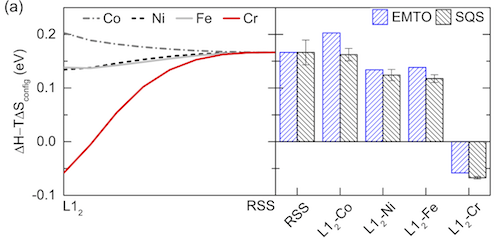
<p>A good SQS is expected to exhibit close performance among all of its permutations. The essential property is of course its total free energy. Ideally, the total free energies of all permutations of the same SQS are equal. But this almost never happens, because it’s almost never possible to obtain a SQS that has perfect correlation functions of pairs, triplets, …, with large enough cutoffs. The energy as a function of permutation fluctuates. The fluctuation can be small or large, depending on the material, the cell size and its correlation functions (the influence of the material is most significant). It is not necessary to persue a small fluctuation with much more time-consuming SQS generation, as long as the energy scattering does not impact your conclusions.</p>

<p>An example is Fig. 2 in one of my papers (C. Niu, et al., Spin-driven ordering of Cr in the equiatomic high entropy alloy NiFeCrCo, Appl. Phys. Lett. 106 (2015) 161906. <a href="http://aip.scitation.org/doi/10.1063/1.4918996" target="_blank">doi:10.1063/1.4918996</a><img src="/img/open_in_new_window.png" alt="img" />):</p>

<p><img src="/img/2017-08-05-SQS-Fig2.png" alt="Fig-2" /></p>

<p>The error bars in the right figure on all SQS columns are based on all possible permutations of the same SQS. As long as these error bars don’t have an influence on the energy comparison, it is OK to have them.</p>

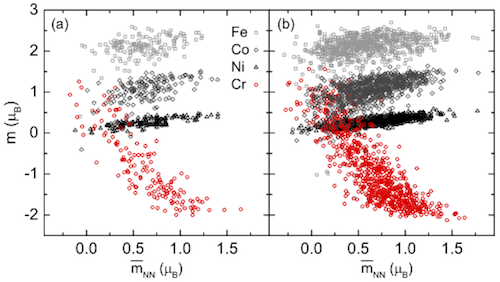
<p><img src="/img/2017-08-05-SQS-Fig1.png" alt="Fig-1" /></p>

<p>Besides total free energy, we can also use other properties to justify whether a SQS is good enough. Above is Fig. 1 in the same paper. The two subplots are from two different SQS – on the left is a small SQS with 24 atoms, and on the right is a large SQS with 120 atoms. Both SQS are for the same fcc random alloy, with similar correlation function settings. In each subplot, the magnetic moments of all atoms in all permutations are collected and plotted as a function of local neighboring magnetic environment. The right subplot has 4X more atoms, thus higher density of points. What I want to show here is that the two subplots show similar trends, which proves the accuracy of the smaller SQS. I also want to point that that this doesn’t mean a small SQS always works, but rather means it’s OK to use small SQS as long as it is proved to have good accuracy for the properties of interest.</p>

<h3 id="how-to-accelerate-the-generation-of-sqs">How to accelerate the generation of SQS?</h3>
<p>The <code class="language-plaintext highlighter-rouge">mcsqs</code> code does not support MPI, but runs on single CPUs. However, it supports <code class="language-plaintext highlighter-rouge">-ip=xx</code> to manually provide a random seed. We can submit several <code class="language-plaintext highlighter-rouge">mcsqs</code> instances to run independently with different random seeds. This will make it faster to find desired SQS. After all is done, select the one with the best correlation function results. Another solution is to use the <code class="language-plaintext highlighter-rouge">-rc</code> flag with different cell shapes for each <code class="language-plaintext highlighter-rouge">mcsqs</code> instance.</p>

<p>A <code class="language-plaintext highlighter-rouge">mcsqs</code> job cannot be restarted. And there is no point to restart. This is because the generation is a Monte Carlo algorithm to randomly search for structures. For example, let’s assume a running <code class="language-plaintext highlighter-rouge">mcsqs</code> instance at objective function = -0.8, and we want to find a SQS with an objective function = -0.9. We can continue this running job, or start with a new one. In both cases, the probability of finding the desired SQS is the same.</p>]]></content><author><name></name></author><summary type="html"><![CDATA[Table of Contents]]></summary></entry></feed>